
Bonza Planet
MinimegaWord
4.31.62K Reviews
- Version
- 5.0.1
- Installs
- 100.00K
- Age Rating
- Everyone
Screenshots
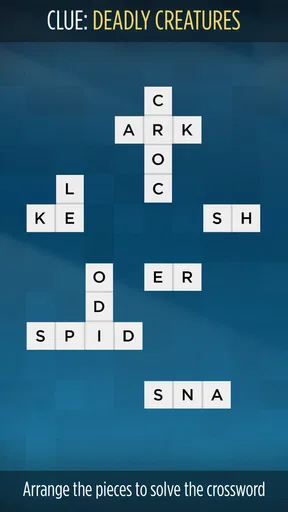
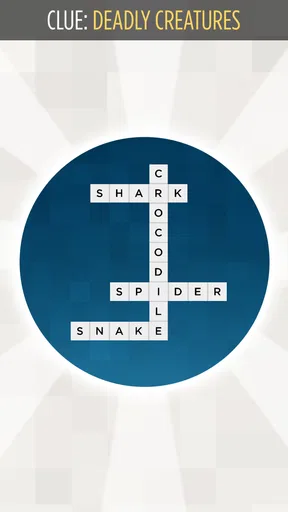


Our Review of Bonza Planet
 Analysis by Appyee
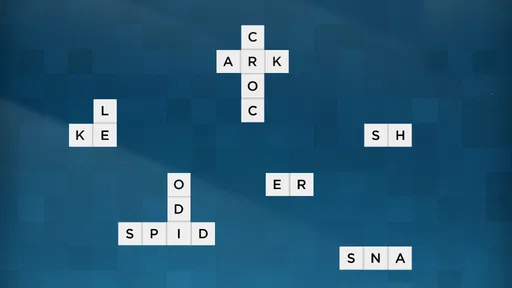
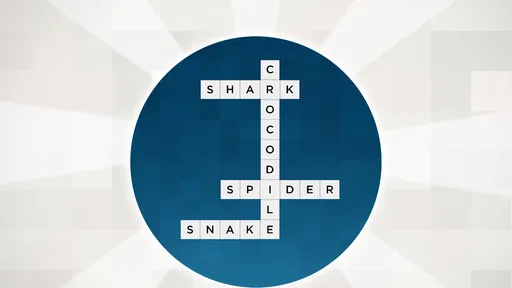
Bonza Planet is a word game from Minimega, the developer behind Bonza Word Puzzle, and it takes a more relaxed route than the usual timed anagram or crossword app. I found its appeal in the way it turns word solving into a small, self-contained activity rather than something that demands a long session. It is free to start, rated for Everyone, and sits comfortably in the kind of game I can open when I have a few quiet minutes.
The important thing to understand is that this is not best approached like a conventional crossword. The satisfaction comes from working out how pieces of a word puzzle belong together, then letting the larger answer take shape. That makes it a good fit for players who enjoy language, pattern recognition, and gentle problem solving. It is less suitable if you want constant speed, competitive leaderboards, or a clearly explained tutorial that removes every bit of uncertainty.
Where the first puzzles can feel confusing
My first adjustment was learning not to treat every visible piece as an isolated clue. Bonza Planet asks you to think about relationships between fragments and the broader word or theme they suggest. If you immediately search for a complete answer after seeing one promising part, you can easily commit too early and make the rest of the puzzle harder to read.
That is the first place many players may get stuck: the game looks simple, but its simplicity hides a different solving rhythm. I had better results when I paused after each placement and checked whether the emerging arrangement made sense as a whole. A move that solves one small area can still be wrong if it leaves an awkward combination elsewhere.
Another source of friction is the lack of urgency. Players coming from fast word games may initially wonder whether they are supposed to act quickly. I would not play it that way. The experience rewards observation more than reflexes, so rushing tends to create unnecessary rearranging. Treating each puzzle as a visual language problem makes the design feel much more coherent.
There is also a difference between being stuck and simply needing more time. When I could not see the next move, repeatedly tapping around rarely helped. Looking at the full board, identifying the most recognizable word group, and then testing the pieces around it was more productive. This is a useful habit because it prevents one uncertain guess from controlling the entire solve.
What to check before blaming the game
If a puzzle seems unresponsive, I first check whether I am touching the intended piece rather than an empty area or a neighboring fragment. Small word-game controls can feel imprecise when I am tapping quickly, especially on a phone with a compact display. Slowing down and making one deliberate move at a time often resolves what feels like a technical problem.
I also pay attention to whether a move has actually been accepted. When several pieces look similar, it is easy to assume that the game ignored a tap when the real issue is that the selected fragment was not the one I meant to choose. I recommend watching the board after every action instead of performing several taps in succession.
Because the game is free, it is tempting to begin playing immediately without checking the basics of the device. I would make sure the operating system is supported; the listed minimum is Android 5.0. On an older phone, closing other demanding apps before starting is a sensible general step. It will not change the puzzle design, but it can reduce interruptions caused by a device that is already struggling.
The current version is 5.0.1, so I would also check that the installed copy is current through the normal app store process. Updating is especially worth trying if the game closes unexpectedly or behaves differently after a system update. I would avoid deleting the app as a first response, since reinstalling can create its own problems if local progress is not preserved.
A calmer setup makes the game easier to judge
I recommend launching Bonza Planet when you have enough attention to read the puzzle rather than testing it during a rushed commute or while switching between several apps. The game is casual in length, but solving still benefits from a clear view of the pieces. A quiet setup also helps you decide whether you genuinely enjoy its style instead of mistaking distraction for poor design.
For families, the Everyone rating makes it an approachable choice, although younger players may still need help with vocabulary or with understanding how the pieces relate. I would treat it as a shared word activity rather than assuming that the age rating means every puzzle will be equally easy for every child.
It is worth deciding in advance whether you want to spend money inside a free game. Individual in-app purchases range from $0.99 to $46.99, so I would review any purchase prompt carefully and keep the experience free if that is your preference. The presence of purchases does not prevent casual play, but it is a practical consideration for parents and anyone trying to keep a strict mobile budget.
My best setup tip is to begin with a short session and learn the game’s visual logic before judging its depth. The opening impression can be deceptively quiet. Once I stopped expecting a standard crossword grid, I became more interested in how each small decision affected the complete arrangement.
Recovering when a solve goes off track
When I make a poor placement, my first response is not to restart immediately. I retrace the last few decisions and look for the point where the overall pattern stopped improving. This is more useful than randomly moving pieces because it turns a failed attempt into information about the puzzle’s structure.
A practical recovery method is to separate certainty from possibility. I mentally mark the fragments that clearly belong together, then leave the ambiguous ones alone until the board offers more context. This prevents a speculative word from becoming the foundation for every later move. It is one of the most useful habits I developed while playing, and it works particularly well when several fragments appear plausible.
If I reach a dead end, I take a brief break rather than forcing the answer. Word recognition is surprisingly sensitive to fatigue. Returning with fresh eyes can reveal a connection that was visible all along. This is where Bonza Planet differs from a timed word scramble: stepping away does not feel like losing a race, and the slower pace is part of its value.
Players who use hints or assistance should consider them a learning tool rather than a replacement for solving. Before taking help, I ask myself what kind of uncertainty I have: do I not recognize a word, do I misunderstand the arrangement, or am I overlooking a simple connection? Identifying the problem first makes any assistance more useful and reduces the chance of repeating the same mistake on the next puzzle.
Another helpful workflow is to solve from the strongest clue outward. Instead of trying to interpret every fragment at once, I choose the group that feels most familiar and use it as an anchor. Then I test nearby pieces against that anchor. This approach is less mentally noisy than scanning the entire board repeatedly, and it gives me a clear reason for each move.
When progress feels lost
If your progress appears to have disappeared, resist the urge to clear storage or reinstall right away. First close and reopen the game, check that you are using the same device profile as before, and make sure the app has finished any normal update process. These are general recovery steps, but they are safer than immediately removing an app whose local state you may still need.
I would also avoid switching repeatedly between devices while trying to diagnose a progress issue. Establish which device contains the most recent state, then test the game there first. Keeping the troubleshooting process simple makes it easier to tell whether the problem is a temporary display issue, an interrupted session, or a genuine loss of progress.
For a puzzle that appears frozen, I would wait briefly, return to the main screen if possible, and relaunch the game. If the problem happens only once, it may be a temporary app or device hiccup. If it repeats, note exactly what you were doing immediately beforehand. That detail is more useful than a vague report that the game “does not work,” especially when seeking help from the developer.
When the app is not the cause
Not every frustrating session points to a defect in Bonza Planet. A dim display, aggressive battery-saving mode, limited free storage, or a phone running many background apps can make any game feel unreliable. I check those ordinary causes before deciding that the app itself is at fault.
Network conditions can also complicate a mobile game experience, particularly around store access, updates, or any content that needs to load. If the game starts normally but something related to downloading or updating does not, I test another connection and confirm that the app store itself is functioning. That distinction matters because reinstalling the game will not fix a wider connection or account problem.
Device age is another fair consideration. The minimum Android requirement is 5.0, but meeting a minimum does not guarantee the same comfort on every handset. Older hardware may have a smaller screen, slower transitions, or less room for other apps to remain open. I would not judge the puzzle mechanics from a single rough session on a phone that is already showing problems elsewhere.
On iOS or Android, basic checks remain similar: restart the device, install pending system updates through the normal settings, and confirm that the app store account is behaving normally. I would not grant unusual permissions or install unofficial copies to solve a simple game problem. Staying with the official app-store route is the safest way to keep troubleshooting straightforward.
There is also a human cause: the game may simply not match your preferred kind of word play. If you want definitions, a traditional grid, or a large dictionary-learning component, the issue is not that Bonza Planet is broken. A crossword app, spelling trainer, or competitive anagram game may be a better match. Recognizing that early saves time and gives the game a fairer assessment.
How it compares with familiar word-game alternatives
Compared with a standard crossword, Bonza Planet feels less dependent on clue-writing conventions and more focused on arranging language into a coherent pattern. That can be refreshing when I want a visual puzzle, but crossword fans who enjoy detailed clues and a fixed grid may find it lighter than expected.
Compared with a timed anagram game, it is much more forgiving in spirit. There is less pressure to produce words at speed, which makes it suitable for a quiet break or a shared session. The trade-off is that players seeking rapid rounds and a strong competitive pulse may find the pace too gentle.
Compared with a word-search game, it asks for more interpretation. I am not simply scanning a field for hidden vocabulary; I am trying to understand how pieces belong within the larger puzzle. That extra layer gives it more personality, though it can also make the first few sessions less immediately obvious.
Its connection to the makers of Bonza Word Puzzle is useful context for expectations, but I would not choose it solely because I enjoyed another game from the same developer. The central question is whether you like discovering structure from fragments. If that sounds satisfying, the free entry point makes trying it low-risk. If you prefer explicit instructions and predictable clue-to-answer relationships, another word category may serve you better.
Who will enjoy it, and who should skip it
I would recommend Bonza Planet to players who like language but do not always want a demanding brain-training session. It works well for short pauses, relaxed evening play, and situations where you want to stop and resume without feeling punished for taking your time. It can also suit two people sharing a phone, since discussing possible connections is part of the fun.
It is a particularly good choice for someone tired of repetitive word searches but not ready for a difficult crossword. The puzzles encourage a middle ground: enough uncertainty to make solving rewarding, without requiring specialist knowledge of crossword conventions.
I would skip it if your priority is a competitive score chase, rapid-fire rounds, or a comprehensive vocabulary course. I would also be cautious if purchase prompts are a concern in your household; although the game is free, the available purchase range means parental controls and store-account habits are worth checking before handing it to a child.
Players with visual difficulties may want to test the piece layout on their own screen before committing to longer sessions. A word game depends on being able to distinguish fragments comfortably, and a design that feels clear on one display may be less comfortable on another. That is not a criticism of the concept so much as a reminder that screen size and readability affect this particular style of play.
My practical verdict after using it
Bonza Planet succeeds because it gives word solving a distinct physical shape. I enjoyed the moments when a scattered set of fragments began to make sense, especially after resisting the urge to force an early answer. The game is not loud or demanding, and that restraint is exactly why it can work as a dependable short-session choice.
The main friction is the learning curve around its puzzle language. New players may need to unlearn habits from crosswords and anagrams before the board feels natural. Technical complaints should also be approached methodically: check the device, app version, connection, and store setup before assuming the puzzle itself is responsible.
Minimega’s game has earned a 4.3 average from around 10K ratings, with over 100K installs, which fits my impression that it has found a solid audience without presenting itself as a universal word-game replacement. It was released on Jun 16, 2015, and the current version is 5.0.1, so anyone installing it today should still make the simple compatibility and update checks part of the first session.
My recommendation is straightforward: try Bonza Planet if you want a free, Everyone-rated word game built around patient pattern solving rather than speed. Give it a few puzzles, use the anchor-and-expand method when you stall, and keep your purchase preferences in mind. I would not call it the best choice for every word-game fan, but for the right player it offers a pleasantly different way to spend a few unhurried minutes.
Verdict
Strengths of Bonza Planet
- Creative crossword format with connected word groups to solve.
- Educational clues introduce facts about countries, nature, and cultures.
- Short puzzles make it easy to play during brief breaks.
- Relaxing presentation with gentle visuals and accessible gameplay.
- Regular themed content adds variety beyond the main puzzle set.
Limitations of Bonza Planet
- Some clues may feel obscure without strong general knowledge.
- Later puzzles can become challenging and require repeated attempts.
- The minimalist interface may offer limited customization options.
- Progress can feel slow if you prefer fast-paced puzzle games.
- Some content or features may depend on in-app purchases.
Similar Picks in This Category
View All
Word Search - Word Puzzle Game
Bluetile4.8

Word Search Quest - Puzzles
Blackout Lab4.8

CodyCross: Crossword Puzzles
Fanatee, Inc.4.7

Words of Wonders: Crossword
Fugo Games4.9

Wordscapes: Word puzzle game
PeopleFun4.7

Word Search Explorer
PlaySimple Games4.9
Frequently Asked Questions
What is Bonza Planet and how does the game work?
Bonza Planet is a relaxing word puzzle game built around arranging word tiles into connected groups. Instead of solving a traditional crossword with fixed clues and squares, you explore a themed puzzle and fit words together in the correct structure. The game is designed to be approachable, but later puzzles can require careful thinking, vocabulary knowledge, and experimentation before everything falls into place.
Is Bonza Planet free to download and play?
Bonza Planet can generally be downloaded for free, although the available content and purchase model may depend on the version distributed through the App Store or Google Play. Some puzzles or features may require in-app purchases, while optional purchases can provide access to additional content. Before downloading, check the store listing for the current pricing, supported devices, and any stated restrictions.
Does Bonza Planet require an internet connection?
An internet connection may be needed for the initial download, updates, advertisements, account-related services, or accessing newly released puzzle content. However, many of the puzzles that are already installed can usually be played offline, making the game suitable for travel or places with limited connectivity. Availability of offline play can vary by platform and app version.
Is Bonza Planet suitable for children and casual players?
Bonza Planet is suitable for many casual players because its controls are simple and the gameplay is based on words rather than fast reactions. It can also be a good choice for families and older children who enjoy vocabulary challenges. Nevertheless, some puzzles may use less familiar words or require language skills, so younger players may occasionally need help.
What are the main advantages and disadvantages of Bonza Planet?
The main advantages of Bonza Planet are its original word-puzzle format, calm presentation, intuitive tile-based controls, and wide variety of themed challenges. It offers a refreshing alternative to standard crossword games and can be played in short sessions. Potential disadvantages include difficulty spikes, dependence on language knowledge, limited enjoyment for players who dislike word games, and possible in-app purchases or advertisements.
Play our best games!


